Snip-It Pro, A Code Snippet Organization Tool2.5.1
Publisher Description
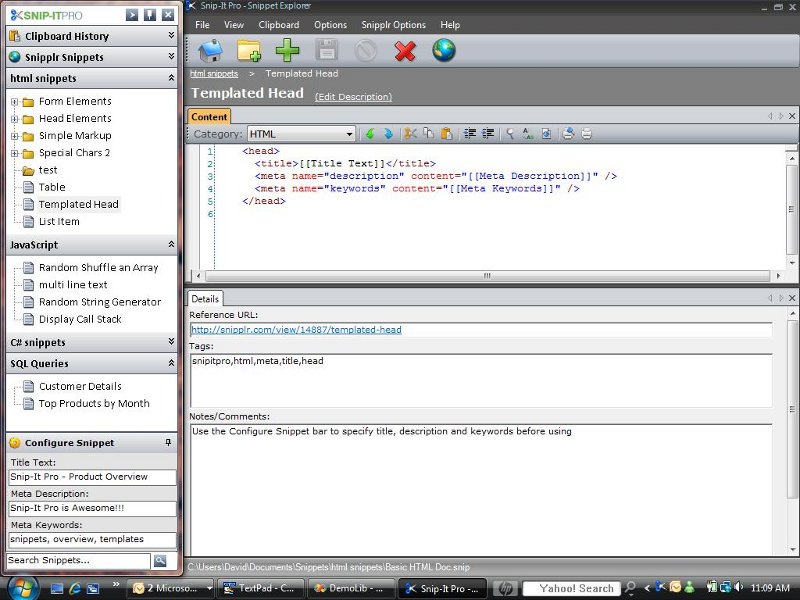
Save Snippets, Keystrokes and Time with Snip-It Pro, the code library organizer designed to make developers, designers and database professionals more productive. Put your favorite queries, JavaScript functions, helper classes, CSS hacks, regular expressions, command line arguments, html blocks and other useful code you find online in one place... Snip-It Pro has two windows: the Snippet Toolbar, which docks to the side of your screen allowing you to drag and drop snippets to almost any application, and the Snippet Explorer which used to edit snippet details with syntax highlighting and printing support... Snip-It Pro lets you store snippets anywhere. Put them on a network share and your entire team can use the same snippet collections... Import and Export snippets and send collections of snippets as a single file... Save Time using templated code snippets. This feature allows you to define placeholders in your snippets, which can be easily replaced before use... Save keystrokes with global hot key support. You can assign frequently used snippets a global hot key which will insert your snippet into any application... Track snippet usage with automatic comments. This feature can automatically add comments in all supported languages above your snippet that indicate a unique searchable ID, a reference url, the current user and the date a snippet was used. When you copy snippets from the web, Snip-It Pro tracks the url where it came from... Snip-It Pro is integrated with Snipplr, an online community for sharing code snippets. With Snip-It Pro you can view your favorite snippets as well as publish snippets directly to Snipplr... Snip-It Pro monitors the windows clipboard... Search your snippet library using the built in search feature... Snip-It Pro supports syntax highlihting for many languages including: ASP, C#, C++, C, CSS, Batch, HTML, Java, JavaScript, JSP, Perl, PHP, Pascal, Python, SQL, VB, VB.Net, VB Script and more... Be more productive with Snip-It Pro.
About Snip-It Pro, A Code Snippet Organization Tool
This Source Editors program is available in English. It was last updated on 29 September, 2026. Snip-It Pro, A Code Snippet Organization Tool is compatible with the following operating systems: Windows, Windows-mobile.
The company that develops Snip-It Pro, A Code Snippet Organization Tool is mtelligent Solutions llc. The latest version released by its developer is 2.5.1. This version was rated by 2 users of our site and has an average rating of 3.0.
The download we have available for Snip-It Pro, A Code Snippet Organization Tool has a file size of 2.1 MB. Just click the green Download button above to start the downloading process. The program is listed on our website since 2010-02-14 and was downloaded 239 times. We have already checked if the download link is safe, however for your own protection we recommend that you scan the downloaded software with your antivirus. Your antivirus may detect the Snip-It Pro, A Code Snippet Organization Tool as malware if the download link is broken.
How to install Snip-It Pro, A Code Snippet Organization Tool on your Windows device:
- Click on the Download button on our website. This will start the download from the website of the developer.
- Once the Snip-It Pro, A Code Snippet Organization Tool is downloaded click on it to start the setup process (assuming you are on a desktop computer).
- When the installation is finished you should be able to see and run the program.
Program Details
System requirements
Download information
Pricing
Version History
version 2.5.1
posted on 2010-02-14
Snip-It Pro 2.5.1 adds a few usability features including the ability to set a default snippet category, right click context menus for all text fields, and a combo box title bar to make it easier to create multiple snippets.
version 1.0.1.9
posted on 2008-03-21
Version 1.0.1.9:
Deleted Snippets are now moved to recylce bin.
Snippet Dialog can now be resized, maximized and minimized for easier use.
New "Remove Formatting" Button Added to Toolbar of Snippet Dialog. When pressed, it will remove all custom formatting.
New Copy without Formatting Option added.
